wisemonkeys logo
FeedNotificationProfileManage Forms
FeedNotificationSearchSign in
wisemonkeys logo

Blogs

VIRTUAL MACHINE

profile
Vaibhav Chauhan
Jul 04, 2024
0 Likes
0 Discussions
36 Reads
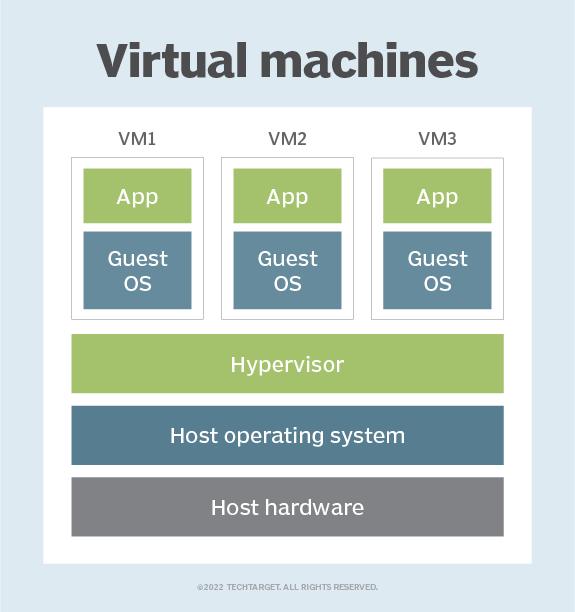
A virtual machine (VM) is a virtual environment which functions as a virtual computer system with its own CPU, memory, network interface, and storage, created on a physical hardware system.
 
VMs are isolated from the rest of the system, and multiple VMs can exist on a single piece of hardware, like a server. That means, it as a simulated image of application software and operating system which is executed on a host computer or a server.
It has its own operating system and software that will facilitate the resources to virtual computers.
 

Benefits:

Let us see the major benefits of virtual machines for operating-system users :
 
• The multiple Operating system environments exist simultaneously on the same machine, which is isolated from each other.
• Virtual machine offers an instruction set architecture which differs from real computer.
• Using virtual machines, there is easy maintenance, application provisioning, availability and convenient recovery.
 

The role of hypervisors in Virtualization:

Virtualization is the method of creating a software-based, or “virtual” version of a computer with good amounts of CPU, memory, and storage that are “borrowed” from a physical host computer (such as your personal computer) and/or a remote server.
 
Hosting VMs on a computer requires a specialized type of software called a hypervisor, which manages resources and allocates them to VMs. The hypervisor also schedules and adjusts how resources are distributed based on the configuration of the hypervisor and VMs, including reallocating resources as demands fluctuate.
 
The hypervisor emulates the computer's CPU, memory, hard disk, network and other hardware resources, creating a pool of resources to allocate to individual VMs according to their specific requirements. The hypervisor can support multiple virtual hardware platforms that are isolated from each other, enabling VMs to run Linux and Windows Server OSes on the same physical host.

Comments ()


Sign in

Read Next

USPS mail

Blog banner

Stop Racism

Blog banner

Paid Email

Blog banner

Deadlock in operating system

Blog banner

Logical and physical address

Blog banner

Memory Management

Blog banner

The Role of cryptography in cyber security

Blog banner

Disk cache

Blog banner

HOW CAN SOCIAL MEDIA MAKE YOU HAPPIER?

Blog banner

Boxing

Blog banner

RACI model in IT services

Blog banner

Software

Blog banner

Decision Tree: A Diagram Model

Blog banner

POSITIVE ATTITUDE IN LIFE

Blog banner

An Overview of Virtual Machines

Blog banner

OLA

Blog banner

I/O Buffering

Blog banner

evolution of operating system - Disha Parekh

Blog banner

Animal’s have my heart

Blog banner

Efficiency of SQL Injection Method in Preventing E-Mail Hacking

Blog banner

Linux Threads:

Blog banner

Operating Systems

Blog banner

15 Interesting Facts about India

Blog banner

Depression

Blog banner

LTE Technology

Blog banner

NETWORK SECURITY RISKS

Blog banner

Virtual memory

Blog banner

The Importance of Financial Literacy for College Students

Blog banner

How social media affect

Blog banner

MAILFENCE

Blog banner

Digital Marketing - The new way to reach end consumer

Blog banner

How to kiss

Blog banner

Memory Management in an Operating System

Blog banner

World’s rarest passport owned by 500 people.

Blog banner

Top Career Paths After a B.Com Degree in Mumbai: What’s Next for You?

Blog banner

10 Things To Do On Valentine's Day If You're Single

Blog banner

Types Of Interrupt

Blog banner

Synchronization

Blog banner

Digital Marketing

Blog banner

MEMORY FORENSIC ACQUISITION AND ANALYSISOF MEMORY AND ITS TOOLS COMPARISON

Blog banner

Beautiful and stunning natural phenomena worth to see

Blog banner

Types of Big Data

Blog banner