wisemonkeys logo
FeedNotificationProfileManage Forms
FeedNotificationSearchSign in
wisemonkeys logo

Blogs

Virtual Memory - Explaination, Working, Steps

profile
Aditya Pai
Aug 13, 2024
0 Likes
0 Discussions
139 Reads

VIRTUAL MEMORY - INTRODUCTION

  • Virtual memory is a memory management technique where section of hard drive can be used as if it were a part of the main memory.
  • It gives the appearance of a large, continuous block of memory to applications, even if the physical memory (RAM) is limited.
  •  It allows systems to run applications requiring large amounts of resources on a device with limited physical RAM.
  • As Physical RAMs are expensive, virtual memory provides a more affordable option to compensate for limited memory.

Note: The maximum size of virtual memory allowed to be created is double that of physical RAM. This means that if the device were to have 8 GB physical RAM, 16 GB of  hard disk space  can be dedicated as virtual memory. 


VIRTUAL MEMORY - WORKING

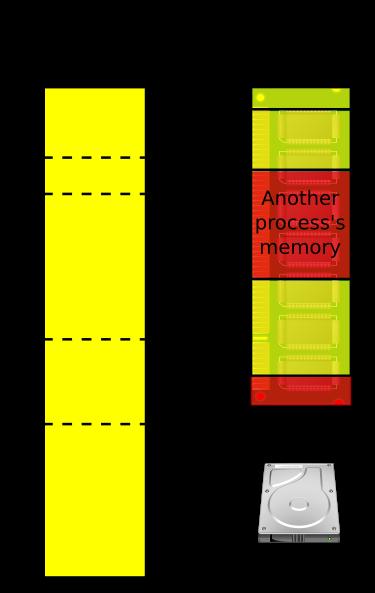
  • Virtual memory uses both hardware and software to operate. When an application is in use, data from that program is stored in a physical address using RAM.
  • A memory management unit (MMU) maps the address to RAM and automatically translates addresses. The MMU can, for example, map a logical address space to a corresponding physical address.
  • While copying virtual memory into physical memory, the OS divides memory with a fixed number of addresses into either pagefiles or swap files. Each page is stored on a disk, and when the page is needed, the OS copies it from the disk to main memory and translates the virtual addresses into physical addresses.

Note: The process of swapping virtual memory to physical is rather slow. This means using virtual memory generally causes a noticeable reduction in performance. This is because hard disk does not have the same high-speed properties of physical RAM.


STEPS TO INCREASE VIRTUAL MEMORY

  1. Right-click This PC > Properties.
  2. Click Advanced system settings > Environment Variables.
  3. Under System variables, click New, set PAGEFILE as the name, and C:\pagefile.sys <InitialSize> <MaximumSize> as the value.
  4. Click OK and restart the PC.

Comments ()


Sign in

Read Next

Different memory allocation strategies

Blog banner

History of ITIL

Blog banner

Blockchain Transactions

Blog banner

OS DESIGN CONSIDERATIONS FOR MULTIPROCESSOR

Blog banner

Anomaly Detection in Behavioral Data Using Machine Learning

Blog banner

MEMORY MANAGEMENT FILE

Blog banner

Impact of social media on the human life

Blog banner

Fault tolerance

Blog banner

Zomato's Secret Digital Marketing Techniques!

Blog banner

RAID and It's Levels

Blog banner

PROCESS CONTROL BLOCK IN OS

Blog banner

Deadlock

Blog banner

Introduction to Virtual Memory - 080

Blog banner

memory cache

Blog banner

MEMORY HIERARCHY

Blog banner

COMPUTER FORENSICS AND GRAPHICS

Blog banner

Process Description

Blog banner

Virtualization

Blog banner

Having passion in life

Blog banner

Never give up

Blog banner

The Evolution of the Microprocessor ~ Aditya Pai

Blog banner

Introduction to Solidity Programming for Blockchain Development

Blog banner

Android Flashlight Application

Blog banner

Note Taker App

Blog banner

Virtual machine.

Blog banner

Data Security and Data Privacy in Data Science

Blog banner

ODOO

Blog banner

Virtual Memory

Blog banner

Importance of self defence for girls

Blog banner

Cache memory

Blog banner

Philadelphia Experiment : Was it real?

Blog banner

Predicting Student Performance with Data Science

Blog banner

“Shot on iPhone” : A campaign by Apple that turned into a prodigy

Blog banner

Brain wash of social media

Blog banner

Networking 101: How to Build Meaningful Connections in College

Blog banner

memory managment

Blog banner

DEVELOPMENTS LEADING TO MODERN OPERATING SYSTEMS

Blog banner

Traveling

Blog banner

Interrupts in operating system.

Blog banner

SECURITY RISKS OF REMOTE WORKING

Blog banner

Multiple-Processor Scheduling in Operating System

Blog banner

Starvation and Deadlock.

Blog banner