1. Code Analysis
Let’s walk through how the code works, step by step:
a. Setup
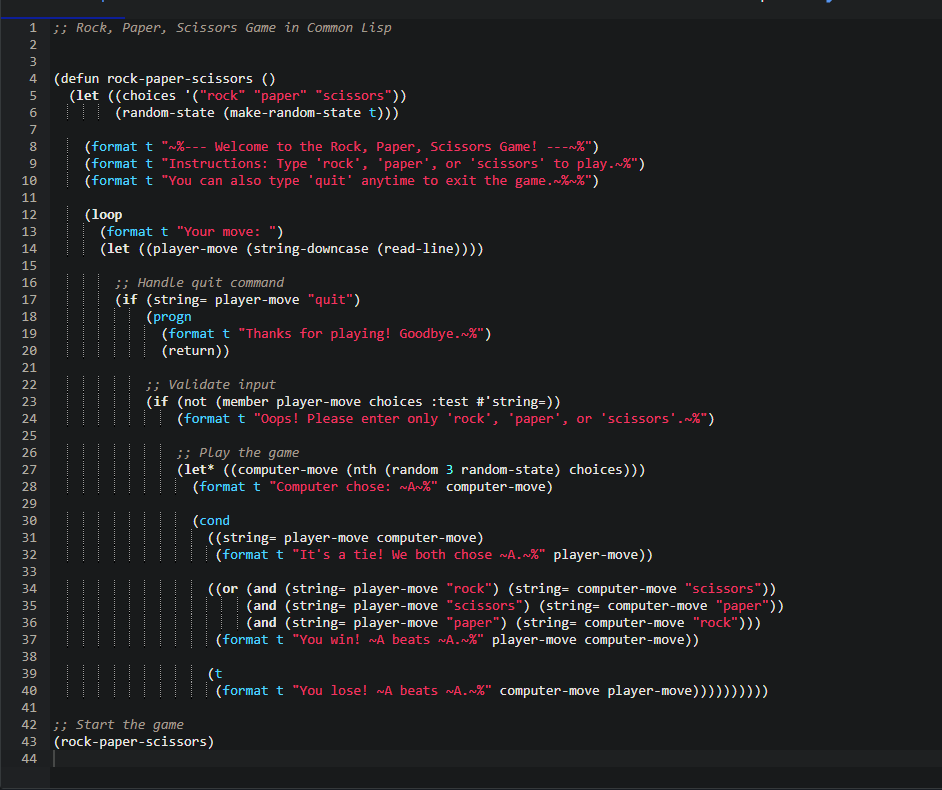
(defun rock-paper-scissors ()
(let ((choices '("rock" "paper" "scissors"))
(random-state (make-random-state t)))
- I defined a function called
rock-paper-scissors. - Inside, I created a list of choices:
"rock", "paper", and "scissors". - I also made a random state to generate random numbers.
b. Welcome Message
(format t "~%--- Welcome to the Rock, Paper, Scissors Game! ---~%")
(format t "Instructions: Type 'rock', 'paper', or 'scissors' to play.~%")
(format t "You can also type 'quit' anytime to exit the game.~%~%")
- Prints a welcome message and tells the player how to play.
c. The Game Loop
(loop
(format t "Your move: ")
(let ((player-move (string-downcase (read-line))))
...
- Starts an infinite loop for continuous gameplay.
- Asks the player to type their move.
- Converts the input to lowercase so it works even if the player types “Rock” or “ROCK”.
d. Handling “quit”
(if (string= player-move "quit")
(progn
(format t "Thanks for playing! Goodbye.~%")
(return))
- If the user types quit, the program says goodbye and exits the loop.
e. Validating Input
(if (not (member player-move choices :test #'string=))
(format t "Oops! Please enter only 'rock', 'paper', or 'scissors'.~%")
- Checks if the user typed a valid move.
- If not, it prints a warning and loops back to ask again.
f. Computer’s Move
(let* ((computer-move (nth (random 3 random-state) choices)))
(format t "Computer chose: ~A~%" computer-move)
- Picks a random move from the list of choices.
- Prints out what the computer chose.
g. Determining the Winner
(cond
((string= player-move computer-move)
(format t "It's a tie! We both chose ~A.~%" player-move))
((or (and (string= player-move "rock") (string= computer-move "scissors"))
(and (string= player-move "scissors") (string= computer-move "paper"))
(and (string= player-move "paper") (string= computer-move "rock")))
(format t "You win! ~A beats ~A.~%" player-move computer-move))
(t
(format t "You lose! ~A beats ~A.~%" computer-move player-move))))
- Checks for a tie first.
- Then checks if the player wins.
- Otherwise, prints that the player lost.
2. Output
Here’s what a sample run looks like: