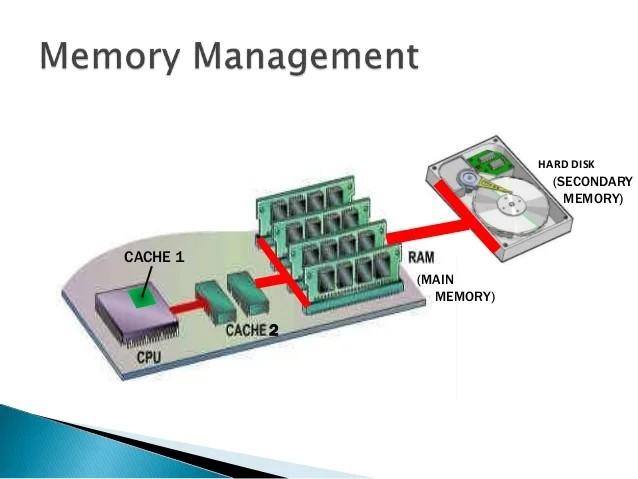
Memory management in an operating system is all about efficiently allocating and using the computer's main memory (RAM). It's a crucial function because RAM is much faster than storage (like a hard drive) but also much more limited in size. Here's a breakdown of its key aspects:
Main goals:
- Allocation: Deciding how much memory to give each running program (process).
- Protection: Ensuring programs don't interfere with each other's memory space, preventing crashes.
- Optimization: Making the best use of available memory, potentially using virtual memory to run more programs than physically fit in RAM.
Common techniques:
- Partitioned allocation: Dividing memory into fixed-size blocks and assigning them to processes. Simple but can lead to internal fragmentation (wasted memory).
- Paged memory: Splitting both physical memory (RAM) and a program's memory space into equal-sized blocks (pages and frames). Allows for non-contiguous allocation and reduces fragmentation.
- Segmented memory: Dividing a program's memory into logical segments (code, data, etc.) that can be different sizes. Offers better memory protection and flexibility.
Virtual memory: A technique that creates the illusion of having more RAM than physically available. It uses a portion of the hard drive as an extension of RAM, allowing the OS to load and run larger programs or more programs at once.
By effectively managing memory, the operating system ensures smooth multitasking, program stability, and efficient use of system resources.
Imagine your computer's memory (RAM) as a big workspace for running programs. Memory management in the operating system (OS) is like your super organized desk manager. Here's what it does:
- Keeps track of space: The manager knows what parts of the desk are free and which programs are using them.
- Gives space when needed: When a new program opens, the manager assigns it a clean area on the desk.
- Cleans up after work: When a program finishes, the manager reclaims its space for others to use.
Bonus trick! The manager can even create a bigger workspace than the physical desk by using some extra storage space (like a cabinet). This lets you work on more programs at once!
This keeps everything organized and running smoothly, just like a good memory management system in your computer!
Memory management is an essential function of an operating system (OS) that handles the allocation, deallocation, and organization of primary memory (RAM) for efficient utilization. It ensures smooth operation by overseeing how programs access and use RAM. Here's a breakdown of key aspects of memory management in OS:
Core Responsibilities:
- Tracking Memory Allocation: The OS maintains a record of every memory location, whether it's free or occupied by a process. This ensures no conflicts arise when multiple programs request memory.
- Allocation and Deallocation: When a program needs memory, the OS allocates a suitable chunk from the available pool. Conversely, when a program finishes execution, the OS reclaims the memory it used.
- Virtual Memory Management: Modern OSes employ virtual memory, which creates the illusion of having more RAM than physically available. It leverages secondary storage (hard disk) to store inactive program sections and swap them back into RAM when required. This enables running programs larger than physical RAM capacity.
Techniques for Memory Management:
- Fixed Partitioning: Divides memory into fixed-size blocks. Simple to implement but may lead to internal fragmentation if processes don't exactly fit the block sizes.
- Paging: Splits both physical memory (RAM) and logical memory (program address space) into fixed-size blocks called frames and pages, respectively. Offers flexibility and avoids internal fragmentation.
- Segmentation: Divides a program's logical address space into variable-sized segments based on logical units (code, data, etc.). Enables better memory protection and access control.
Benefits of Effective Memory Management:
- Efficient Memory Utilization: Minimizes wasted memory space and optimizes usage for multiple running programs.
- Process Isolation: Protects processes from interfering with each other's memory, preventing data corruption.
- Program Execution Support: Enables running programs larger than physical RAM by utilizing virtual memory.
Overall, Memory management is a critical component of an operating system, ensuring efficient application execution, system stability, and optimal hardware resource utilization.