wisemonkeys logo
FeedNotificationProfileManage Forms
FeedNotificationSearchSign in
wisemonkeys logo

Blogs

Processes : Process description and control

profile
4475 Mit Gohil
Jul 05, 2024
0 Likes
0 Discussions
51 Reads

Processes in the context of computing refer to instances of executing programs on a computer system. Each process has its own memory space, resources, and execution context. Here's a breakdown of the key aspects related to processes:

  1. Process Description:
    • Program Execution: A process represents the execution of a program. It includes the program code, associated data, and resources like open files and network connections.
    • Memory Space: Each process typically has its own memory space, which includes the executable code, variables, stacks, heaps, etc.

    • Resource Allocation: Processes may require various system resources (CPU time, memory, files) which are allocated to them by the operating system.

      • Process ID (PID): A unique identifier assigned to each process by the operating system, which helps in managing and distinguishing between different processes.

      2.Process Control:

      • Creation: Processes are created either by the operating system when a program is started or by another process (parent process) using system calls like fork() (Unix-like systems) or CreateProcess() (Windows).
      • Scheduling: The operating system scheduler decides which process gets to use the CPU and for how long, based on scheduling algorithms (e.g., round-robin, priority-based scheduling).

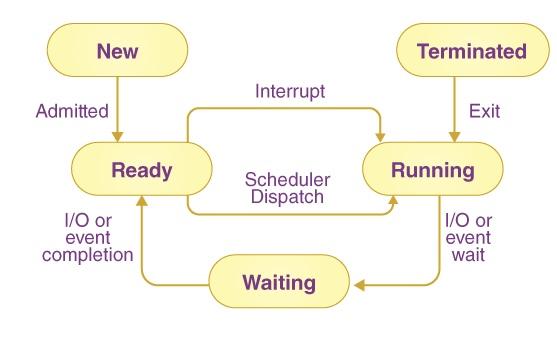
        Execution State: Processes transition between different states such as running, ready, waiting (blocked), or terminated. State transitions are managed by the operating system scheduler and are influenced by events like I/O operations, timers, and signals.

      • Termination: Processes can terminate either voluntarily (by calling exit) or involuntarily (due to errors or signals). Upon termination, resources allocated to the process are released by the operating system.                       

        3. Process Communication and Synchronization:

        • Processes often need to communicate and synchronize with each other, especially in multi-process or multi-threaded environments.
        • Mechanisms for inter-process communication (IPC) include shared memory, message passing (pipes, sockets, message queues), and synchronization primitives (mutexes, semaphores) to coordinate access to shared resources.

          4.Process States:

          • Running: The process is currently executing instructions on the CPU.
          • Ready: The process is ready to execute and waiting for its turn to be assigned to a CPU core.
          • Waiting (Blocked): The process is waiting for an event (such as I/O completion) or resource allocation (like memory) before it can proceed.
          • Terminated: The process has finished execution, and its resources have been released back to the system.
          • Understanding processes and their control is fundamental to operating system design, resource management, and application development, especially in ensuring efficient and stable execution of programs on a computer system.



Comments ()


Sign in

Read Next

AutoML: The Future of Automated Data Science

Blog banner

Rules and Regulations of Networking: "Standards and Protocols" - Part 1

Blog banner

Direct Memory Access

Blog banner

Deadlocks

Blog banner

“Shot on iPhone” : A campaign by Apple that turned into a prodigy

Blog banner

Metasploit

Blog banner

Data Science in Everyday Life (like a phone, shopping cart, or social media icons)

Blog banner

DNS Cache

Blog banner

Theads

Blog banner

File Organization and Access

Blog banner

GUIDE TO GIS

Blog banner

'Positivity in life'

Blog banner

Cross site scripting Attack

Blog banner

Visualization in Data Science

Blog banner

What is Vishing?

Blog banner

Linker

Blog banner

Modern Operating System

Blog banner

Dal Bafla Recipe

Blog banner

Message Passing in OS

Blog banner

Concurrency and Deadlocks

Blog banner

Operating system

Blog banner

Virtual memory

Blog banner

Skills An Ethical Hacker Must Have

Blog banner

How To Setup DVWA Using XAMPP on Windows

Blog banner

I/O Buffering

Blog banner

Types Of scheduling

Blog banner

Evolution of operating systems

Blog banner

Operating system evolution

Blog banner

Understanding Regression Analysis

Blog banner

Why Consistency in Eating Habits Matters and How Meal Maharaj Makes It Easy

Blog banner

The Power of Cyber Forensic in Solving Crimes

Blog banner

GraphQL

Blog banner

What is time ? The term which has astonished Scientists

Blog banner

RAID_142

Blog banner

LIMITED EDITION

Blog banner

Jira Software

Blog banner

SPEM

Blog banner

VIRTUAL MEMORY

Blog banner

What do you mean by online marketing and why do you need to know about it

Blog banner

1.1 basic elements

Blog banner

What are Virtual Machines

Blog banner

AI and cyber Security

Blog banner