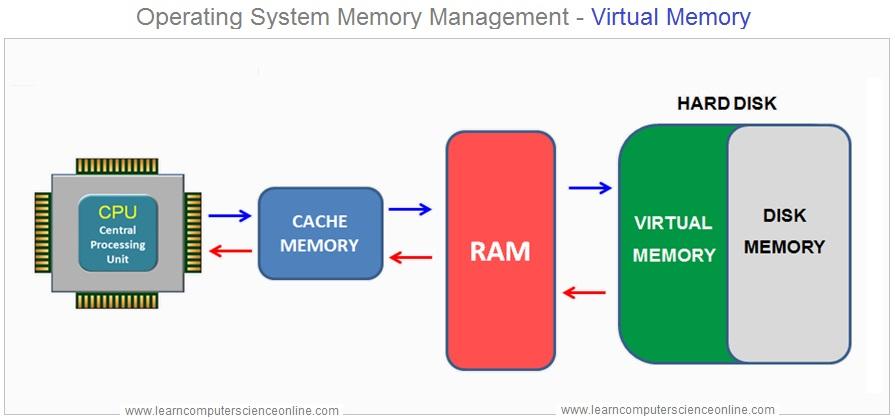
Windows Virtual Memory is a system component that allows your computer to compensate for physical memory (RAM) shortages by temporarily transferring data from RAM to a space on the hard drive or SSD, known as the **page file** or **swap file**. This process enables your computer to handle larger workloads and run more applications simultaneously than it could with just physical RAM.
How Virtual Memory Works:
1. Page File : When the physical RAM is full, Windows moves some data that hasn't been used recently from RAM to the page file. This frees up RAM for other tasks.
2. Paging : The process of moving data between RAM and the page file is called "paging." Windows uses a technique called "demand paging," where data is only moved when needed.
3. Performance Impact : Accessing data in virtual memory (page file) is slower than accessing data in physical RAM because hard drives and SSDs are slower than RAM. Therefore, excessive reliance on virtual memory can slow down your system.
4. Configuration : By default, Windows automatically manages the size of the page file, but users can also configure it manually based on their needs.
Importance:
- Prevents Crashes : Virtual memory helps prevent system crashes by ensuring that the system doesn't run out of memory.
- Running Large Applications : It enables the running of large applications or multiple applications simultaneously without being constrained by the amount of physical RAM.
- Memory Management : Efficiently manages system memory to maintain performance.
In summary, Windows Virtual Memory is an essential component that extends the effective amount of memory available to the system, though at a cost in performance when it is heavily used.