
wisemonkeys logo
FeedNotificationProfileManage Forms
FeedNotificationSearchSign in
wisemonkeys logo

Blogs

Cache Memory

profile
Kushal Chauhan
Jul 04, 2024
0 Likes
0 Discussions
549 Reads

Understanding Cache Memory

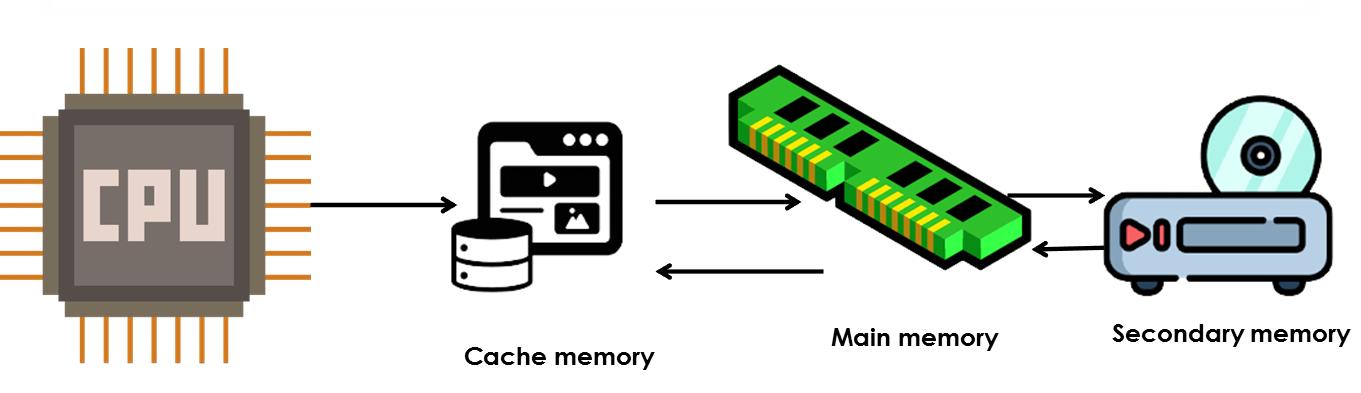
Although cache memory is invisible to the OS, it interacts with other memory management hardware.Cache memory is a small-sized type of volatile computer memory that provides high-speed data access to the processor and reduces the average cost (latency) of accessing memory. It operates on the principle of locality of reference, where recently accessed data and instructions are likely to be accessed again in the near future.

Advantages

1. Cache Memory is Faster than Main Memory and Secondary Memory

Cache memory is designed to be much faster than both main memory (RAM) and secondary memory (such as hard drives or SSDs). Here's why:

  • Proximity to CPU: Cache memory is physically closer to the CPU than main memory or secondary memory. It is typically integrated directly onto the CPU chip or located very close to it on the motherboard. This proximity reduces the time it takes for the CPU to access data and instructions stored in the cache.

  • Reduced Latency: The access time of cache memory is significantly lower than that of main memory and secondary memory. This reduction in latency allows the CPU to fetch data and instructions more quickly, thereby speeding up program execution.

2. Programs Stored in Cache Memory Execute Faster

  • Since cache memory has lower access times and is directly accessible by the CPU, programs and instructions stored in cache can be executed more quickly. This is crucial for applications that require rapid data access, such as real-time processing tasks or high-performance computing.

3.Lower Data Access Time Compared to Main Memory

Cache memory offers faster data access times compared to main memory for several reasons:

  • Cache Hierarchy: Modern computer systems employ a hierarchical cache structure, typically consisting of multiple levels (L1, L2, L3 caches) with varying sizes and speeds. The smallest and fastest cache (L1 cache) is closest to the CPU, providing the lowest access times.

  • Locality of Reference: Cache memory utilizes the principle of locality of reference, where recently accessed data and instructions are likely to be accessed again in the near future. This reduces the average access time by keeping frequently used data readily available.

4. Improves CPU Performance by Storing Frequently Used Data and Instructions

Cache memory stores data and instructions that are frequently accessed by the CPU. This strategic storage mechanism enhances CPU performance in several ways:

  • Reduced Memory Latency: Since cache memory reduces the latency associated with fetching data from main memory or secondary storage, the CPU spends less time waiting for data to be fetched. This allows for smoother and faster execution of programs.

  • Enhanced Instruction Throughput: By storing frequently used instructions in cache memory, the CPU can execute program instructions in rapid succession. This improves instruction throughput and overall computational efficiency.

Cache Management Strategies

Efficient management of cache memory involves strategies to optimize hit rates (percentage of accesses that result in a cache hit) and minimize miss penalties (time taken to fetch data from slower memory). Key strategies include:

  • Prefetching: Bringing data into the cache before it is explicitly requested based on predicted access patterns.
  • Write Policies: Determining when to write data back to main memory (write-through vs write-back policies).
  • Cache Coherence: Ensuring consistency among multiple caches in a multi-core or distributed system to maintain data integrity.

Impact of Cache Memory on System Performance

Cache memory significantly impacts the overall performance of operating systems by:

  • Improving Response Time: Faster access to data and instructions reduces the time required to execute programs.
  • Enhancing CPU Utilization: By reducing stalls due to memory accesses, allowing the CPU to operate more efficiently.
  • Supporting Multi-tasking: Facilitating concurrent execution of multiple processes by minimizing memory contention.


Comments ()


Sign in

Read Next

geographic information system (GIS)

Blog banner

Internet of Things

Blog banner

Social engineering in cyber security

Blog banner

Memory heirachy (Operating system)

Blog banner

Facebook marketing

Blog banner

Hello World

Blog banner

SMARTSHEET MANAGEMENT SOFTWARE

Blog banner

Types of Viruses

Blog banner

Paging

Blog banner

ADD A SPICE TO YOUR LIFE.

Blog banner

Operating system

Blog banner

Operating system

Blog banner

How Cyber Forensics help prevent Crimes

Blog banner

Amazon

Blog banner

Platonic Solids

Blog banner

Microsoft Windows Overview

Blog banner

Virtual Machine

Blog banner

MAILFENCE

Blog banner

Is Your Password Complex Enough?

Blog banner

Defining youtubr

Blog banner

Information of meesho company

Blog banner

File Organization and Access

Blog banner

child Labour

Blog banner

Privacy in Social Media and Online Services

Blog banner

Impacts of Data Breach On Companies Challenges and Prevention

Blog banner

IO Buffers

Blog banner

GOOGLE

Blog banner

Solving Problems with AI: The Power of Search Algorithms

Blog banner

How social media affect

Blog banner

Cyber Security in Data Breaching

Blog banner

INTERNET SECURITY

Blog banner

Mumbaicha Dabbawalla

Blog banner

Importance of Morning Routines for Students During the Festive Season

Blog banner

Measuring IT Risk

Blog banner

The Five Steps of Data Science

Blog banner

ITIL Version 3 and 4 differenciation?

Blog banner

The Role of Teachers in Building a Child’s Confidence

Blog banner

World’s rarest passport owned by 500 people.

Blog banner

Vikrant’s first blog

Blog banner

Rock, Paper, Scissors Game in Common Lisp

Blog banner

Top Career Paths After a B.Com Degree in Mumbai: What’s Next for You?

Blog banner

Models of Information Security.

Blog banner